Screenshots show the French version of the app.
Deleting your account is permanent: your personal information is erased and you lose access to all your sites, in every company you are a member of. You can do it from the app or from the dashboard.
Before you start
- Are you the only administrator of a company? First appoint another administrator (see What can each role do?). Otherwise, the deletion is refused with the message "You are the only administrator of …". This rule does not apply if you are alone in the company.
- Do you want to keep a copy of your data? Download it before deleting your account: afterwards, it is no longer available (see Where is your data and how do you get it back?).
- Have you connected Google Calendar or Outlook? Your sites are removed from it automatically, and Buildr's access to your calendar is cut off. An iCal calendar you subscribed to stops, but also remove the subscription in your calendar app (see How do you see your sites in your calendar?).
From the app
- Open the Profile tab.
- Under SECURITY, tap Delete my account.
- Read the warning in the "Permanently delete your account?" window.
- Enter your password under Enter your password to confirm.
- Tap Delete permanently.
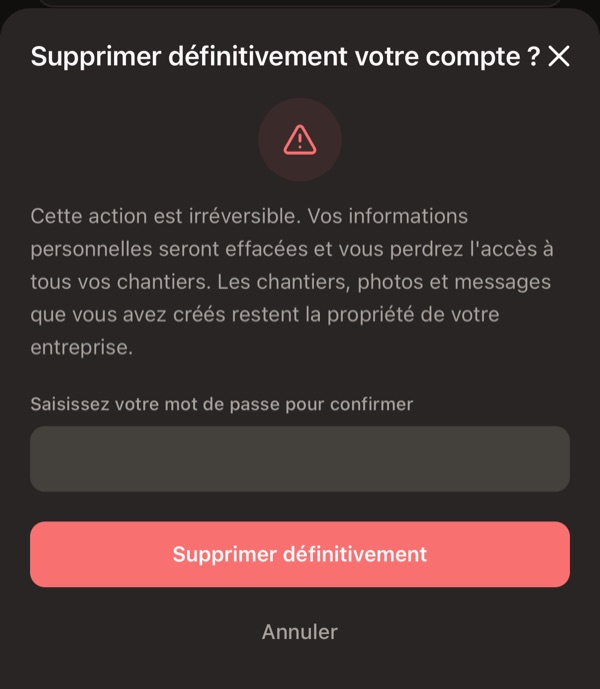
You are signed out right away, on this phone as on your other devices, and the app goes back to the sign-in screen. To stop before the end, tap Cancel.
From the dashboard
- Click Settings in the menu.
- In the Your data card, click Delete my account.
- Read the warning in the "Permanently delete your account?" window.
- Enter your password under Enter your password to confirm.
- Click Delete permanently.
You are signed out everywhere, and the dashboard goes back to the sign-in page. If the password is wrong, the message "Incorrect password." is shown and nothing is deleted. To stop before the end, click Cancel.
What is erased, what stays
| What happens to it | |
|---|---|
| Your name, your e-mail, your phone number, your photo, your company name | Erased |
| Your password and your sessions on your devices | Erased: no one can sign in to this account any more |
| Your place in companies, teams and sites | Removed |
| Your notifications, your calendar connections, your iCal subscription | Cut off |
| The sites, photos, messages and documents you created | Kept by your company, without your name |
| Your reported messages and photos whose report is pending | Deleted |
Sites, photos and messages belong to the company you worked for: they are the history of its sites. To ask for them to be deleted, contact its administrator.
Good to know
- No longer have access to the app or the dashboard? Write to privacy@getbuildr.fr from your account's e-mail address, with the subject "Account deletion".
- Your e-mail address is freed up: you can create a new account with it, but it will start from scratch.
- Just want to stop being disturbed? No need to delete your account: adjust your notifications (see How do you choose the notifications you receive?).