Screenshots show the French version of the app.
Your company is created only once, by the person who runs it. You automatically become its Admin. Your teams have nothing to create: you invite them afterwards.
Create your account and your company
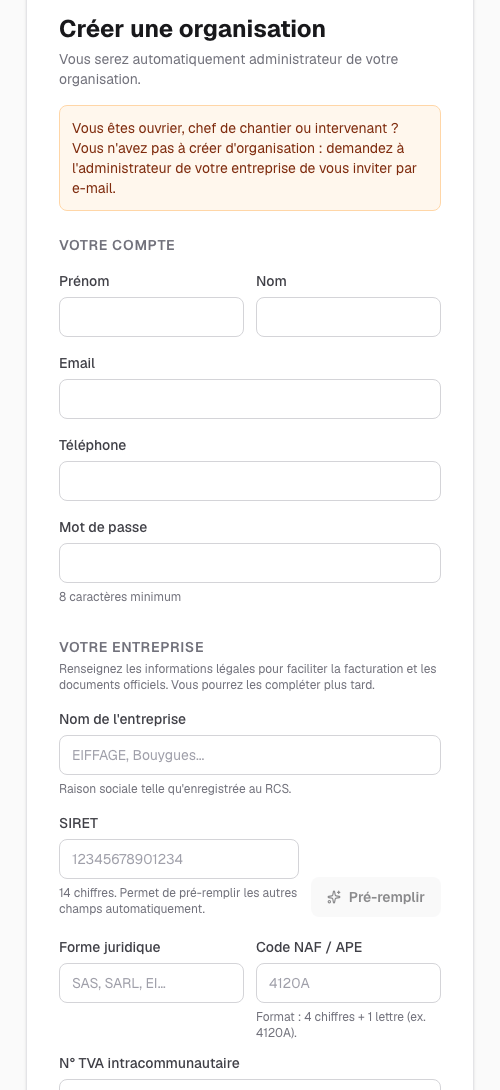
- On a computer, open app.getbuildr.fr, then click Create an organization, below the login button.
- Under Your account, enter your First name, your Last name, your Email, your Phone and a Password of at least 8 characters.
- Under Your company, enter the Company name.
- If you like, enter your SIRET and click Auto-fill: the name, head office address, legal form, NAF code and VAT number fill in automatically. The rest, such as the ten-year liability insurance, can wait.
- Click Create my account.
You land on your company's dashboard, empty for now.
Next
- Invite your team: Team menu, Invite button (see How do you invite your team?).
- Create your first site (see How do you create a site?).
- Install the app on your phone and log in with the same e-mail address and password.
Good to know
- Are you a worker, site manager or client? Don't create a company: ask your employer to invite you by e-mail (see How do you join your company from an invitation?).
- The company is created from the dashboard, not from the mobile app.
- Legal information can be completed later, in Settings, Legal information card.
- Buildr rejects passwords that appear in known data breaches: choose another one if that's the case.