Screenshots show the French version of the app.
Does a message or a photo seem inappropriate to you? You can report it to your company's administrator, or block its author so you no longer see it. The person concerned is never notified.
Report content or a person
- Open the menu of what you want to report:
- a message, in a discussion or an emergency thread: press and hold it;
- a photo: tap it to open it;
- a person: in the site's Team tab, tap their name.
- Tap Report.
- Choose the Reason: Inappropriate content, Harassment or abusive remarks, Off topic or Other. The send button becomes active once the reason is chosen.
- If you wish, add Details.
- Tap Send report.
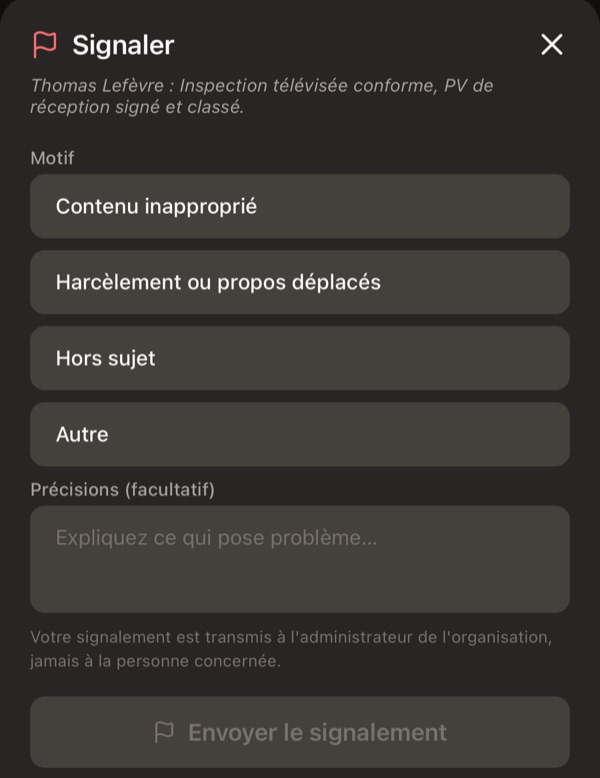
The report goes to your company's administrator, who reviews it. The content stays visible: the administrator decides what happens next.
Block someone
- Press and hold one of their messages, or tap their name in the site's Team tab.
- Tap Block, then confirm.
Their messages and photos are no longer shown to you, and you no longer get notifications for what they post. The person stays in the team and keeps working normally: the block only affects you.
Unblock someone
- Open the Profile tab.
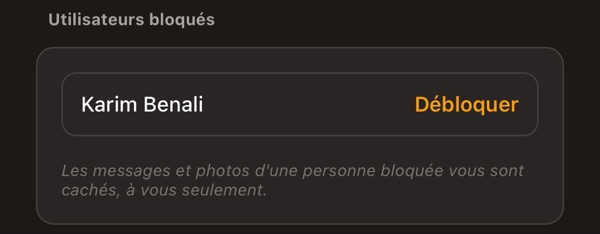
- Under Blocked users, tap Unblock next to their name.
Good to know
- You cannot report or block your own messages.
- The person does not know you reported or blocked them.
- An urgent message or a dangerous situation on the site? Report an emergency instead (see How do you report an emergency on a site?).