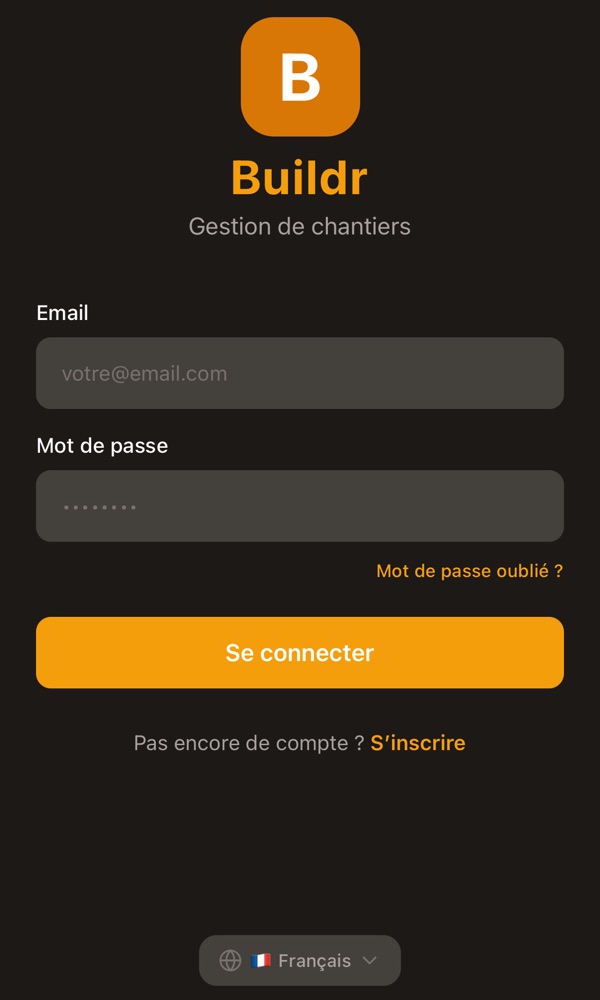
Screenshots show the French version of the app.
The Buildr app is for use on site: steps, photos, discussions, emergencies. It is free and connects to the same account as the dashboard.
Install the app
- iPhone: Buildr on the App Store
- Android: Buildr on Google Play
You can also search for "Buildr" in your phone's store.
Sign in
- Open the app.
- Enter your Email and your Password.
- Tap Sign in.
You land on the Sites tab, with the sites you have been added to.
You don't have an account yet?
A Buildr account is not created from the app:
- You work for a company that uses Buildr: ask its administrator to invite you, then follow the link you receive by e-mail (see How do you join your company from an invitation?).
- You run the company: create it from the dashboard (see How do you create your company on Buildr?).
Good to know
- You choose the language at the bottom of the sign-in screen, even before you sign in.
- Forgot your password? Tap Forgot your password?, just above the Sign in button: you receive a link by e-mail to choose a new one.
- Allow notifications when the app asks, so you are alerted to messages and emergencies (see How do you choose the notifications you receive?).